
Anyone who has bought enterprise storage knows the cycle. You spend $20,000 to $50,000 on the chassis. Then you sign a five-year licensing agreement for snapshots, replication, and the cloud-sync features the marketing site led with. By year three, you are paying more in support renewals than you did for the hardware itself. By year five, the vendor's enterprise-renewal team is calling once a quarter to remind you about all the new licenses you would need to stay current.
That math stops today. UniFi released the Enterprise NAS at $3,999, with ZFS, iSCSI, AD/LDAP integration, and zero license fees. We have one staged in Jacksonville and are deploying two in Atlanta this month to replace the aging QNAPs that currently host DPC Cloud.
The Specs That Make This Enterprise-Grade
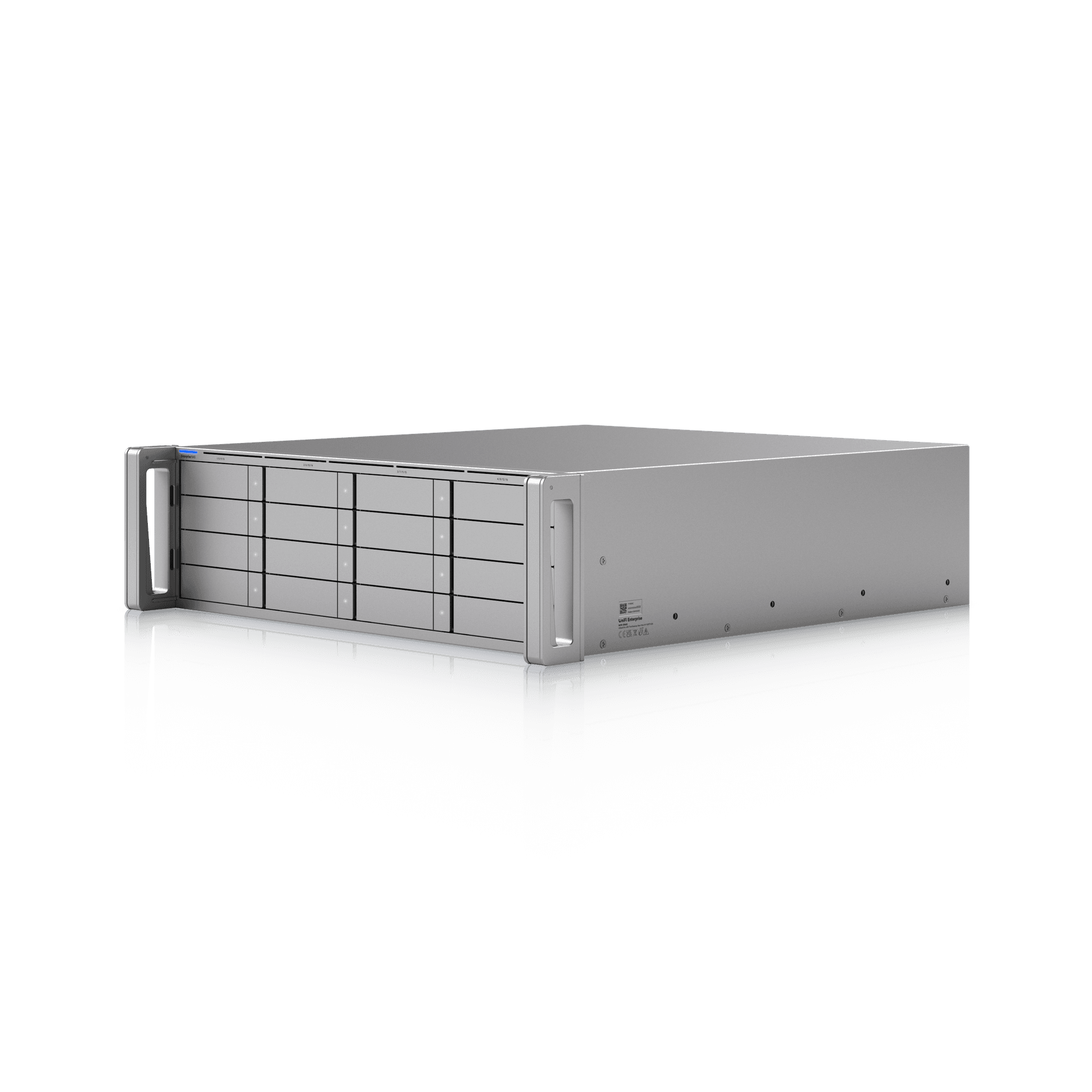
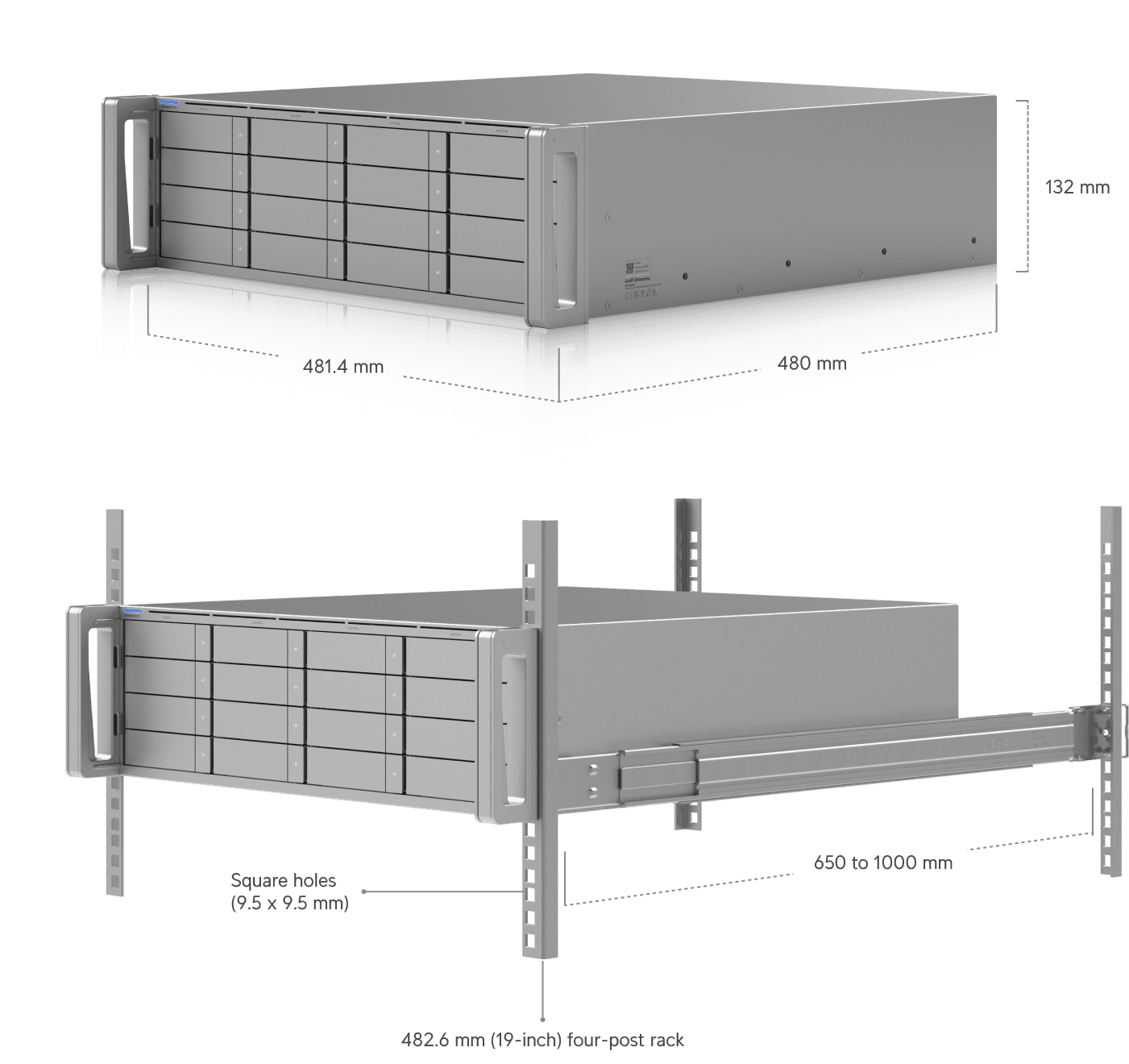
The headline is the connectivity. This is a 3U rack-mount unit with sixteen 2.5/3.5-inch drive bays, two dedicated NVMe bays for SSD cache, and back-panel networking that frankly does not exist at this price point on the legacy side: dual 25 Gbps SFP28, a 10 GbE RJ45, and two SFF-8644 expansion ports that let you push past a petabyte of raw capacity per node when paired with future enterprise expansion chassis.
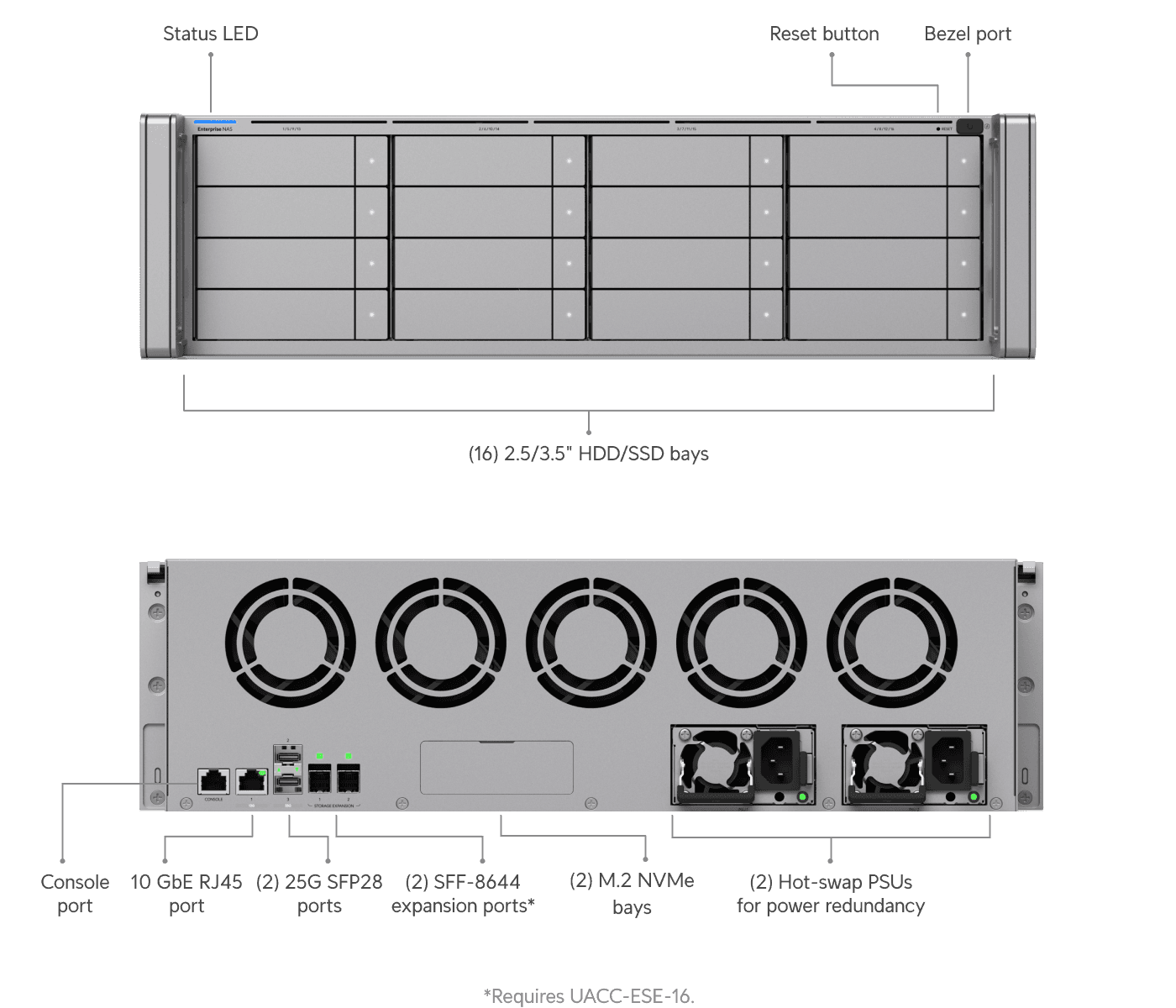
The compute side runs a 24-core ARM Neoverse N2 processor at 2.4 GHz with 64 GB of ECC memory — serious silicon for a NAS in this price class. Two hot-swappable 550W power supplies handle power redundancy. They share a form factor with the EFG Core, which means one cold spare in your cabinet covers either device. Five hot-swap fan modules round it out.
One limit worth knowing up front: the NVMe SSD cache caps at 8 terabytes (two drives, 4 TB max each). For most workloads that is plenty. For very large random-read workloads, it is something to plan around.
The Three Features Everyone Was Asking For
For two years, every UniFi NAS review we have done has had the same three comments in it: where is ZFS, where is iSCSI, and how do I run this without a single power supply being a single point of failure. The Enterprise NAS answers all three.
ZFS, properly. Mirror, RAID-Z1, RAID-Z2, RAID-Z3, hot-spare support, plus in-line compression and deduplication. UniFi's implementation is wrapped in their typical click-to-create UI, which means you can spin up a Z2 pool in about thirty seconds and move on with your day. Power users who want every ZFS tunable exposed will find the simplification frustrating compared to TrueNAS, but for most production workloads the curated UI is the right tradeoff.
iSCSI block storage. This is what unlocks the real enterprise use cases — live virtual machine migration in Proxmox, VMware, and Hyper-V clusters, shared block storage for multiple compute nodes, and HA storage for virtualization. Setting up an iSCSI target took us under five minutes through the UI: create a host group, define a LUN, set thin or thick provisioning, choose your record size, save. Done.
Dual hot-swap power supplies. No single point of failure on power. Each supply is rated 550W, swappable live from the back, and uses the same chassis as the EFG Core. Keep a spare on the shelf, swap a failed unit with zero downtime.
The Same UI Your Techs Already Know
This is the part that gets missed in NAS comparisons. The Enterprise NAS runs the same UniFi interface that ships on a $379 UCG Fiber, a $1,499 UDM Pro Max, and the EFG Core sitting one rack unit above it. Identity import from Active Directory or LDAP, native UniFi Endpoint integration for secure file access on any device, Site Manager fabric backups across sites — same console our techs use to manage gateways and Protect installations.
We issue every DPC technician a UniFi firewall for their home network when they onboard. By the time they touch enterprise-grade UniFi gear at a client site, the interface is muscle memory. More MSPs are standardizing on UniFi every year for the same reason — labor is the most expensive line item in a managed services business, and the fastest way to lower it is to standardize on a stack a Level 1 tech and a senior engineer can both navigate without re-learning the tools.
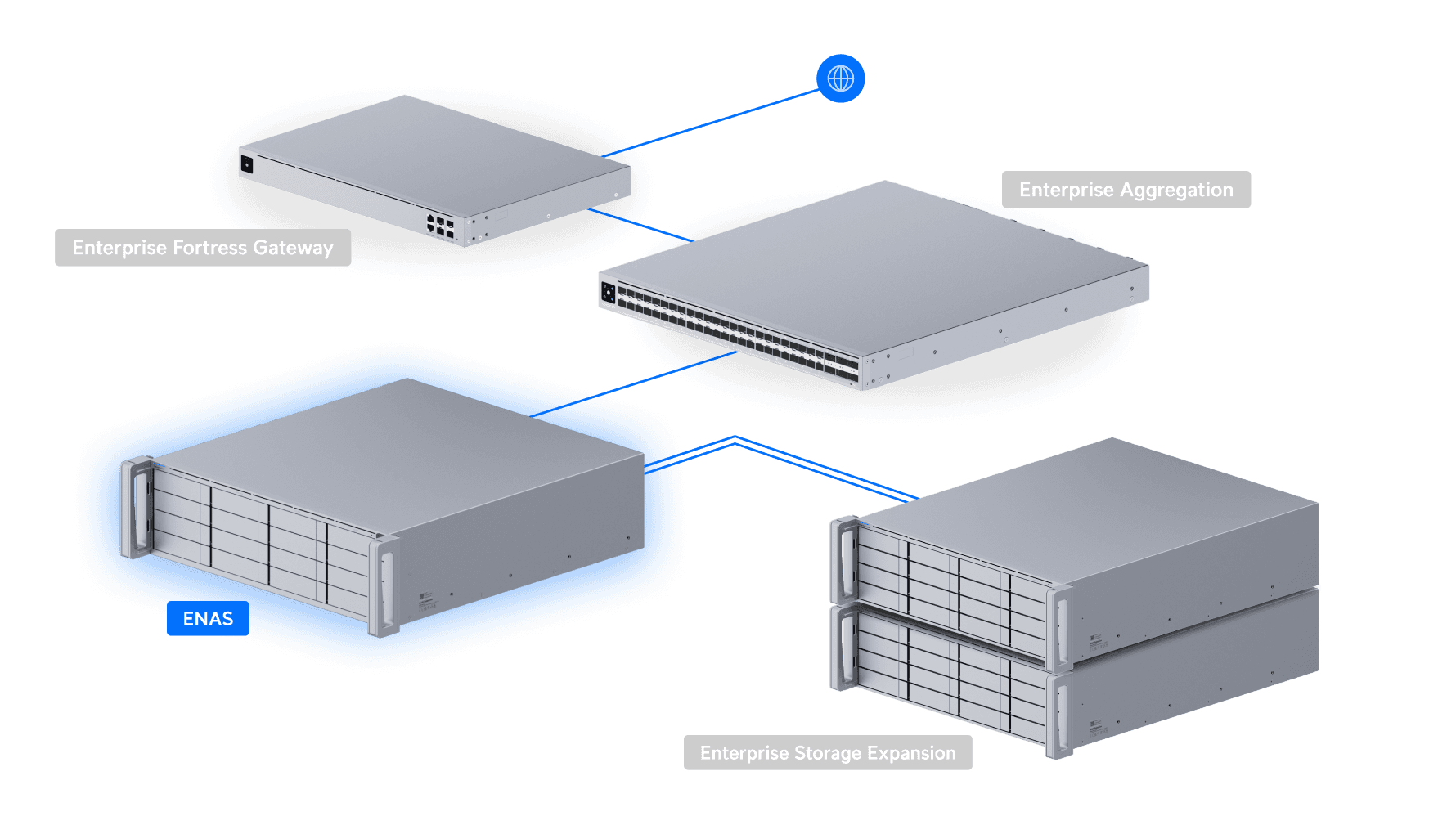
For DPC, the deployment is clean. Two Enterprise NAS units in HA at our Atlanta data center, sitting behind the pair of EFG Core firewalls we deployed last week, connected through an Enterprise Aggregation Switch. Cross-site replication to our Jacksonville rack for offsite backup. Microsoft 365 backup direct from the cloud accounts to the on-prem NAS via UniFi Protect Cloud Backup. Gateway, switch, storage, identity, backup — one interface.
Who Should Actually Buy This
The Enterprise NAS is not the right NAS for every business. Walk through these before you spec it in:
- Do you need shared block storage for a virtualization cluster? This is where it earns its price the fastest. iSCSI for Proxmox, VMware, or Hyper-V live migration is the headline use case, and the 25 Gbps SFP28 connectivity makes it actually fast.
- Do you have multi-site backups, replication, or HA storage requirements? Site Manager fabric backups, identity-aware access controls, and the dual-PSU redundancy story all matter at this scale. If you have one office with a handful of workstations hitting one share, the smaller UNAS Pro 4 at a fraction of the price is the smarter call.
- Are you in a regulated industry like healthcare, legal, or finance? HIPAA, HITECH, and similar frameworks reward businesses that can demonstrate redundant storage with proper backup chains. The Enterprise NAS makes the audit story easier and the documentation thinner.
- Do you have ten or more team members hitting shared data? Below that, simpler boxes are fine. Above it, the connectivity, capacity, and HA features start mattering.
If most of those check yes, the Enterprise NAS earns its $3,999. If not, the existing UNAS Pro lineup at a lower price point is probably the right answer.
What This Means for Your Business
For the businesses we manage, this release changes a real conversation. Until now, recommending iSCSI block storage or ZFS to a 25-person professional services firm meant either spec'ing $30,000-plus of QNAP or Synology gear, pricing out a TrueNAS build the client would not maintain, or telling them honestly that those features were out of budget. Most of them ended up sticking with the devil they knew — an aging NAS limping along on a vendor's "extended" support tier, with the data they cannot afford to lose sitting on drives that are out of warranty. None of those are good options. The Enterprise NAS makes the recommendation easy in a way it never was before.
The other piece is the data backup and recovery side. License-free Microsoft 365 backup, native cloud destinations (Backblaze B2, Wasabi, Amazon S3, Drive, Dropbox, OneDrive), and SMB/CIFS replication targets mean the backup chain is built into the box. For most of our clients, that chain has historically required two or three separate licensed services. The Enterprise NAS collapses it onto one device they already own.
The hardware costs less than the annual licensing for the box it is replacing. That math is going to keep coming up.
Where to Buy
If you are spec'ing UniFi gear for an install, shop the Enterprise NAS through our affiliate link — it supports the channel at no extra cost to you.
DPC Technology has been the trusted IT partner for small businesses across Florida, Georgia, and South Carolina since 1995, with deep specialization in managed IT, cybersecurity, and enterprise storage design. If your business has 10 or more employees in the Southeast and you're looking for an ongoing managed services partner, give us a call at (844) 260-5020.